apoc.import.graphml
|
从本地文件导入需要将 |
语法 |
|
||
描述 |
从提供的 GraphML 文件导入图。 |
||
输入参数 |
名称 |
类型 |
描述 |
|
|
要导入数据的文件名或二进制数据。 |
|
|
|
|
|
返回参数 |
名称 |
类型 |
描述 |
|
|
导入数据的文件名。 |
|
|
|
导入数据的来源:“file”、“binary”或“file/binary”。 |
|
|
|
文件格式:["csv", "graphml", "json"]。 |
|
|
|
导入的节点数量。 |
|
|
|
导入的关系数量。 |
|
|
|
导入的属性数量。 |
|
|
|
导入持续时间。 |
|
|
|
返回的行数。 |
|
|
|
导入运行时批处理的大小。 |
|
|
|
导入运行的批次数量。 |
|
|
|
导入是否成功运行。 |
|
|
|
导入返回的数据。 |
|
配置参数
该存储过程支持以下配置参数
| 名称 | 类型 | 默认值 | 描述 |
|---|---|---|---|
|
|
false |
根据节点元素的 |
|
|
RELATED |
如果 GraphML 文件中未指定关系类型,则使用的默认关系类型 |
|
|
false |
存储节点元素的 |
|
|
20000 |
每个事务处理的元素数量 |
|
|
|
允许接收二进制数据,未压缩(值: |
|
|
空映射 |
见下文 |
|
|
空映射 |
见下文 |
源/目标配置
允许在源节点和/或目标节点不在文件中时导入关系,通过自定义标签和属性搜索节点。为此,我们可以在配置映射中插入 source: {label: '<MY_SOURCE_LABEL>', id: ’<MY_SOURCE_ID>'}` 和/或 source: {label: '<MY_TARGET_LABEL>', id: ’<MY_TARGET_ID>'}`。通过这种方式,我们可以通过 edge 标签的 source 和 end 属性搜索起始节点和结束节点。
例如,使用配置映射 {source: {id: 'myId', label: 'Foo'}, target: {id: 'other', label: 'Bar'}} 和类似 <edge id="e0" source="n0" target="n1" label="KNOWS"><data key="label">KNOWS</data></edge> 的边行,我们搜索源节点 (:Foo {myId: 'n0'}) 和结束节点 (:Bar {other: 'n1'})。id 键是可选的(默认值为 'id')。
输出参数
| 名称 | 类型 |
|---|---|
file |
STRING |
source |
STRING |
format |
STRING |
nodes |
INTEGER |
relationships |
INTEGER |
properties |
INTEGER |
time |
INTEGER |
rows |
INTEGER |
batchSize |
INTEGER |
batches |
INTEGER |
done |
BOOLEAN |
data |
STRING |
从文件读取
默认情况下,从文件系统导入是禁用的。我们可以通过在 apoc.conf 中设置以下属性来启用它
apoc.import.file.enabled=true如果我们尝试使用任何导入过程而未首先设置此属性,我们将收到以下错误消息
Failed to invoke procedure: Caused by: java.lang.RuntimeException: Import from files not enabled, please set apoc.import.file.enabled=true in your apoc.conf |
导入文件从 import 目录读取,该目录由 server.directories.import 属性定义。这意味着我们提供的任何文件路径都是相对于此目录的。如果尝试从绝对路径(例如 /tmp/filename)读取,我们将收到类似于以下内容的错误消息
Failed to invoke procedure: Caused by: java.lang.RuntimeException: Can’t read url or key file:/path/to/neo4j/import/tmp/filename as json: /path/to/neo4j//import/tmp/filename (No such file or directory) |
我们可以通过在 apoc.conf 中设置以下属性来启用从文件系统上的任何位置读取文件
apoc.import.file.use_neo4j_config=false|
Neo4j 现在将能够从文件系统上的任何位置读取,因此在设置此属性之前请务必确认这是您的意图。 |
使用示例
导入简单 GraphML 文件
simple.graphml 文件包含来自 GraphML primer 的图表示。

<?xml version="1.0" encoding="UTF-8"?>
<graphml xmlns="http://graphml.graphdrawing.org/xmlns"
    xmlns:xsi="http://www.w3.org/2001/XMLSchema-instance"
    xsi:schemaLocation="http://graphml.graphdrawing.org/xmlns
     http://graphml.graphdrawing.org/xmlns/1.0/graphml.xsd">
  <graph id="G" edgedefault="undirected">
    <node id="n0"/>
    <node id="n1"/>
    <node id="n2"/>
    <node id="n3"/>
    <node id="n4"/>
    <node id="n5"/>
    <node id="n6"/>
    <node id="n7"/>
    <node id="n8"/>
    <node id="n9"/>
    <node id="n10"/>
    <edge source="n0" target="n2"/>
    <edge source="n1" target="n2"/>
    <edge source="n2" target="n3"/>
    <edge source="n3" target="n5"/>
    <edge source="n3" target="n4"/>
    <edge source="n4" target="n6"/>
    <edge source="n6" target="n5"/>
    <edge source="n5" target="n7"/>
    <edge source="n6" target="n8"/>
    <edge source="n8" target="n7"/>
    <edge source="n8" target="n9"/>
    <edge source="n8" target="n10"/>
  </graph>
</graphml>simple.graphml 导入图CALL apoc.import.graphml("http://graphml.graphdrawing.org/primer/simple.graphml", {})如果我们运行此查询,将看到以下输出
| file | source | format | nodes | relationships | properties | time | rows | batchSize | batches | done | data |
|---|---|---|---|---|---|---|---|---|---|---|---|
"http://graphml.graphdrawing.org/primer/simple.graphml" |
"file" |
"graphml" |
11 |
12 |
0 |
618 |
0 |
-1 |
0 |
TRUE |
NULL |
我们也可以将 simple.graphml 复制到 Neo4j 的 import 目录中,然后从那里导入文件。
然后我们可以通过以下方式运行导入过程
simple.graphml 导入图CALL apoc.import.graphml("file://simple.graphml", {})下面的 Neo4j Browser 可视化显示了导入的图
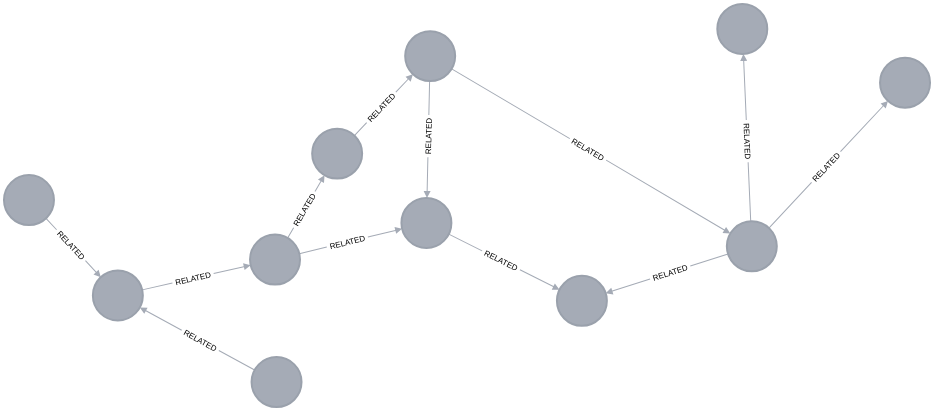
导入由导出 GraphML 存储过程创建的 GraphML 文件
movies.graphml 包含 Neo4j 电影图的一个子集,由 导出 GraphML 存储过程 生成。
<?xml version="1.0" encoding="UTF-8"?>
<graphml xmlns="http://graphml.graphdrawing.org/xmlns" xmlns:xsi="http://www.w3.org/2001/XMLSchema-instance" xsi:schemaLocation="http://graphml.graphdrawing.org/xmlns http://graphml.graphdrawing.org/xmlns/1.0/graphml.xsd">
<key id="born" for="node" attr.name="born"/>
<key id="name" for="node" attr.name="name"/>
<key id="tagline" for="node" attr.name="tagline"/>
<key id="label" for="node" attr.name="label"/>
<key id="title" for="node" attr.name="title"/>
<key id="released" for="node" attr.name="released"/>
<key id="roles" for="edge" attr.name="roles"/>
<key id="label" for="edge" attr.name="label"/>
<graph id="G" edgedefault="directed">
<node id="n188" labels=":Movie"><data key="labels">:Movie</data><data key="title">The Matrix</data><data key="tagline">Welcome to the Real World</data><data key="released">1999</data></node>
<node id="n189" labels=":Person"><data key="labels">:Person</data><data key="born">1964</data><data key="name">Keanu Reeves</data></node>
<node id="n190" labels=":Person"><data key="labels">:Person</data><data key="born">1967</data><data key="name">Carrie-Anne Moss</data></node>
<node id="n191" labels=":Person"><data key="labels">:Person</data><data key="born">1961</data><data key="name">Laurence Fishburne</data></node>
<node id="n192" labels=":Person"><data key="labels">:Person</data><data key="born">1960</data><data key="name">Hugo Weaving</data></node>
<node id="n193" labels=":Person"><data key="labels">:Person</data><data key="born">1967</data><data key="name">Lilly Wachowski</data></node>
<node id="n194" labels=":Person"><data key="labels">:Person</data><data key="born">1965</data><data key="name">Lana Wachowski</data></node>
<node id="n195" labels=":Person"><data key="labels">:Person</data><data key="born">1952</data><data key="name">Joel Silver</data></node>
<edge id="e267" source="n189" target="n188" label="ACTED_IN"><data key="label">ACTED_IN</data><data key="roles">["Neo"]</data></edge>
<edge id="e268" source="n190" target="n188" label="ACTED_IN"><data key="label">ACTED_IN</data><data key="roles">["Trinity"]</data></edge>
<edge id="e269" source="n191" target="n188" label="ACTED_IN"><data key="label">ACTED_IN</data><data key="roles">["Morpheus"]</data></edge>
<edge id="e270" source="n192" target="n188" label="ACTED_IN"><data key="label">ACTED_IN</data><data key="roles">["Agent Smith"]</data></edge>
<edge id="e271" source="n193" target="n188" label="DIRECTED"><data key="label">DIRECTED</data></edge>
<edge id="e272" source="n194" target="n188" label="DIRECTED"><data key="label">DIRECTED</data></edge>
<edge id="e273" source="n195" target="n188" label="PRODUCED"><data key="label">PRODUCED</data></edge>
</graph>
</graphml>movies.graphml 导入图CALL apoc.import.graphml("movies.graphml", {})如果我们运行此查询,将看到以下输出
| file | source | format | nodes | relationships | properties | time | rows | batchSize | batches | done | data |
|---|---|---|---|---|---|---|---|---|---|---|---|
"movies.graphml" |
"file" |
"graphml" |
8 |
7 |
36 |
23 |
0 |
-1 |
0 |
TRUE |
NULL |
我们可以运行以下查询来查看导入的图
MATCH p=()-->()
RETURN p| p |
|---|
({name: "Laurence Fishburne", born: "1961", labels: ":Person"})-[:ACTED_IN {roles: "[\"Morpheus\"]", label: "ACTED_IN"}]→({tagline: "Welcome to the Real World", title: "The Matrix", released: "1999", labels: ":Movie"}) |
({name: "Carrie-Anne Moss", born: "1967", labels: ":Person"})-[:ACTED_IN {roles: "[\"Trinity\"]", label: "ACTED_IN"}]→({tagline: "Welcome to the Real World", title: "The Matrix", released: "1999", la bels: ":Movie"}) |
({name: "Lana Wachowski", born: "1965", labels: ":Person"})-[:DIRECTED {label: "DIRECTED"}]→({tagline: "Welcome to the Real World", title: "The Matrix", released: "1999", labels: ":Movie"}) |
({name: "Joel Silver", born: "1952", labels: ":Person"})-[:PRODUCED {label: "PRODUCED"}]→({tagline: "Welcome to the Real World", title: "The Matrix", released: "1999", labels: ":Movie"}) |
({name: "Lilly Wachowski", born: "1967", labels: ":Person"})-[:DIRECTED {label: "DIRECTED"}]→({tagline: "Welcome to the Real World", title: "The Matrix", released: "1999", labels: ":Movie"}) |
({name: "Keanu Reeves", born: "1964", labels: ":Person"})-[:ACTED_IN {roles: "[\"Neo\"]", label: "ACTED_IN"}]→({tagline: "Welcome to the Real World", title: "The Matrix", released: "1999", labels: ": Movie"}) |
({name: "Hugo Weaving", born: "1960", labels: ":Person"})-[:ACTED_IN {roles: "[\"Agent Smith\"]", label: "ACTED_IN"}]→({tagline: "Welcome to the Real World", title: "The Matrix", released: "1999", la bels: ":Movie"}) |
GraphML 文件中定义的标签已添加到每个节点的 labels 属性中,而不是作为节点标签添加。我们可以将配置属性 readLabels: true 设置为导入原生标签
movies.graphml 导入图并存储节点标签CALL apoc.import.graphml("movies.graphml", {readLabels: true})| file | source | format | nodes | relationships | properties | time | rows | batchSize | batches | done | data |
|---|---|---|---|---|---|---|---|---|---|---|---|
"movies.graphml" |
"file" |
"graphml" |
8 |
7 |
21 |
23 |
0 |
-1 |
0 |
TRUE |
NULL |
现在让我们重新运行查询以查看导入的图
MATCH p=()-->()
RETURN;| p |
|---|
(:Person {name: "Lilly Wachowski", born: "1967"})-[:DIRECTED]→(:Movie {tagline: "Welcome to the Real World", title: "The Matrix", released: "1999"}) |
(:Person {name: "Carrie-Anne Moss", born: "1967"})-[:ACTED_IN {roles: "[\"Trinity\"]"}]→(:Movie {tagline: "Welcome to the Real World", title: "The Matrix", released: "1999"}) |
(:Person {name: "Hugo Weaving", born: "1960"})-[:ACTED_IN {roles: "[\"Agent Smith\"]"}]→(:Movie {tagline: "Welcome to the Real World", title: "The Matrix", released: "1999"}) |
(:Person {name: "Laurence Fishburne", born: "1961"})-[:ACTED_IN {roles: "[\"Morpheus\"]"}]→(:Movie {tagline: "Welcome to the Real World", title: "The Matrix", released: "1999"}) |
(:Person {name: "Keanu Reeves", born: "1964"})-[:ACTED_IN {roles: "[\"Neo\"]"}]→(:Movie {tagline: "Welcome to the Real World", title: "The Matrix", released: "1999"}) |
(:Person {name: "Joel Silver", born: "1952"})-[:PRODUCED]→(:Movie {tagline: "Welcome to the Real World", title: "The Matrix", released: "1999"}) |
(:Person {name: "Lana Wachowski", born: "1965"})-[:DIRECTED]→(:Movie {tagline: "Welcome to the Real World", title: "The Matrix", released: "1999"}) |
二进制文件
您还可以从二进制 byte[](未压缩)或压缩文件(允许的压缩算法有:GZIP, BZIP2, DEFLATE, BLOCK_LZ4, FRAMED_SNAPPY)导入文件。
CALL apoc.import.graphml(`binaryGzipByteArray`, {compression: 'GZIP'})或
CALL apoc.import.graphml(`binaryFileNotCompressed`, {compression: 'NONE'})例如,这与 apoc.util.compress 函数配合使用效果很好
WITH apoc.util.compress('<?xml version="1.0" encoding="UTF-8"?>
<graphml xmlns="http://graphml.graphdrawing.org/xmlns" xmlns:xsi="http://www.w3.org/2001/XMLSchema-instance" xsi:schemaLocation="http://graphml.graphdrawing.org/xmlns http://graphml.graphdrawing.org/xmlns/1.0/graphml.xsd">
<graph id="G" edgedefault="directed">
<node id="n0"> <data key="labels">:FOO</data><data key="name">foo</data> </node>
<node id="n1"> <data key="labels">:BAR</data><data key="name">bar</data> <data key="kids">[a,b,c]</data> </node>
<edge id="e0" source="n0" target="n1"> <data key="label">:EDGE_LABEL</data> <data key="name">foo</data> </edge>
</graph>
</graphml>', {compression: 'DEFLATE'}) as xmlCompressed
CALL apoc.import.graphml(xmlCompressed,  {compression: 'DEFLATE'})
YIELD source, format, nodes, relationships, properties
RETURN source, format, nodes, relationships, properties| source | format | nodes | relationships | properties |
|---|---|---|---|---|
"binary" |
"graphml" |
2 |
1 |
7 |
往返分离的 GraphML 文件
使用此数据集
CREATE (f:Foo:Foo2:Foo0 {name:'foo', born:Date('2018-10-10'), place:point({ longitude: 56.7, latitude: 12.78, height: 100 })})-[:KNOWS]->(b:Bar {name:'bar',age:42, place:point({ longitude: 56.7, latitude: 12.78})});
CREATE (:Foo {name: 'zzz'})-[:KNOWS]->(:Bar {age: 0});
CREATE (:Foo {name: 'aaa'})-[:KNOWS {id: 1}]->(:Bar {age: 666});
我们可以执行这 3 个导出查询
// Foo nodes
call apoc.export.graphml.query('MATCH (start:Foo)-[:KNOWS]->(:Bar) RETURN start', 'queryNodesFoo.graphml', {useTypes: true});

// Bar nodes
call apoc.export.graphml.query('MATCH (:Foo)-[:KNOWS]->(end:Bar) RETURN end', 'queryNodesBar.graphml', {useTypes: true});

// KNOWS rels
MATCH (:Foo)-[rel:KNOWS]->(:Bar)
WITH collect(rel) as rels
call apoc.export.graphml.data([], rels, 'queryRelationship.graphml', {useTypes: true})
YIELD nodes, relationships RETURN nodes, relationships;
在这种情况下,我们将有以下 3 个文件:.queryNodesFoo.graphml
<?xml version='1.0' encoding='UTF-8'?>
<graphml xmlns="http://graphml.graphdrawing.org/xmlns" xmlns:xsi="http://www.w3.org/2001/XMLSchema-instance" xsi:schemaLocation="http://graphml.graphdrawing.org/xmlns http://graphml.graphdrawing.org/xmlns/1.0/graphml.xsd">
<key id="born" for="node" attr.name="born" attr.type="string"/>
<key id="name" for="node" attr.name="name" attr.type="string"/>
<key id="place" for="node" attr.name="place" attr.type="string"/>
<key id="labels" for="node" attr.name="labels" attr.type="string"/>
<graph id="G" edgedefault="directed">
<node id="n0" labels=":Foo:Foo0:Foo2"><data key="labels">:Foo:Foo0:Foo2</data><data key="born">2018-10-10</data><data key="name">foo</data><data key="place">{"crs":"wgs-84-3d","latitude":12.78,"longitude":56.7,"height":100.0}</data></node>
<node id="n3" labels=":Foo"><data key="labels">:Foo</data><data key="name">zzz</data></node>
<node id="n5" labels=":Foo"><data key="labels">:Foo</data><data key="name">aaa</data></node>
</graph>
</graphml><?xml version='1.0' encoding='UTF-8'?>
<graphml xmlns="http://graphml.graphdrawing.org/xmlns" xmlns:xsi="http://www.w3.org/2001/XMLSchema-instance" xsi:schemaLocation="http://graphml.graphdrawing.org/xmlns http://graphml.graphdrawing.org/xmlns/1.0/graphml.xsd">
<key id="name" for="node" attr.name="name" attr.type="string"/>
<key id="place" for="node" attr.name="place" attr.type="string"/>
<key id="age" for="node" attr.name="age" attr.type="long"/>
<key id="labels" for="node" attr.name="labels" attr.type="string"/>
<graph id="G" edgedefault="directed">
<node id="n1" labels=":Bar"><data key="labels">:Bar</data><data key="name">bar</data><data key="age">42</data><data key="place">{"crs":"wgs-84","latitude":12.78,"longitude":56.7,"height":null}</data></node>
<node id="n4" labels=":Bar"><data key="labels">:Bar</data><data key="age">0</data></node>
<node id="n6" labels=":Bar"><data key="labels">:Bar</data><data key="age">666</data></node>
</graph>
</graphml><?xml version='1.0' encoding='UTF-8'?>
<graphml xmlns="http://graphml.graphdrawing.org/xmlns" xmlns:xsi="http://www.w3.org/2001/XMLSchema-instance" xsi:schemaLocation="http://graphml.graphdrawing.org/xmlns http://graphml.graphdrawing.org/xmlns/1.0/graphml.xsd">
<key id="label" for="edge" attr.name="label" attr.type="string"/>
<key id="id" for="edge" attr.name="id" attr.type="long"/>
<graph id="G" edgedefault="directed">
<edge id="e0" source="n0" target="n1" label="KNOWS"><data key="label">KNOWS</data></edge>
<edge id="e1" source="n3" target="n4" label="KNOWS"><data key="label">KNOWS</data></edge>
<edge id="e2" source="n5" target="n6" label="KNOWS"><data key="label">KNOWS</data><data key="id">1</data></edge>
</graph>
</graphml>因此,我们可以通过这种方式在另一个数据库中导入,以使用这些查询重新创建原始数据集
CALL apoc.import.graphml('queryNodesFoo.graphml', {readLabels: true, storeNodeIds: true});
CALL apoc.import.graphml('queryNodesBar.graphml', {readLabels: true, storeNodeIds: true});
CALL apoc.import.graphml('queryRelationship.graphml', {readLabels: true, source: {label: 'Foo'}, target: {label: 'Bar'}});
请注意,我们必须先执行节点导入,并且我们使用 useTypes: true 将节点标签的 id 属性作为属性导入,并使用 readLabels 为节点填充标签。
使用自定义属性键
否则,我们可以利用自定义属性并避免以这种方式导入 id 属性(通过 useTypes:true)(与之前相同的数据集和节点导出查询)
// KNOWS rels
MATCH (:Foo)-[rel:KNOWS]->(:Bar)
WITH collect(rel) as rels
call apoc.export.graphml.data([], rels, 'queryRelationship.graphml',
  {useTypes: true, source: {id: 'name'}, label: {id: 'age'}})
YIELD nodes, relationships RETURN nodes, relationships;
强烈建议使用唯一性约束来确保唯一性,因此在这种情况下,对于标签 Foo 和属性 name,以及对于标签 Bar 和属性 age
以上查询生成此关系文件
<?xml version='1.0' encoding='UTF-8'?>
<graphml xmlns="http://graphml.graphdrawing.org/xmlns" xmlns:xsi="http://www.w3.org/2001/XMLSchema-instance" xsi:schemaLocation="http://graphml.graphdrawing.org/xmlns http://graphml.graphdrawing.org/xmlns/1.0/graphml.xsd">
<key id="label" for="edge" attr.name="label" attr.type="string"/>
<key id="id" for="edge" attr.name="id" attr.type="long"/>
<graph id="G" edgedefault="directed">
<edge id="e0" source="foo" sourceType="string" target="42" targetType="long" label="KNOWS"><data key="label">KNOWS</data></edge>
<edge id="e1" source="zzz" sourceType="string" target="0" targetType="long" label="KNOWS"><data key="label">KNOWS</data></edge>
<edge id="e2" source="aaa" sourceType="string" target="666" targetType="long" label="KNOWS"><data key="label">KNOWS</data><data key="id">1</data></edge>
</graph>
</graphml>
最后,我们可以使用与上述相同的 id(name 和 age)导入文件
CALL apoc.import.graphml('queryNodesFoo.graphml', {readLabels: true});
CALL apoc.import.graphml('queryNodesBar.graphml', {readLabels: true});
CALL apoc.import.graphml('queryRelationship.graphml',
  {readLabels: true, source: {label: 'Foo', id: 'name'}, target: {label: 'Bar', id: 'age'}});