apoc.load.xml
|
从本地文件加载需要将 |
|
|
语法 |
|
||
描述 |
从 XML URL(例如 web-API)加载单个嵌套的 |
||
输入参数 |
名称 |
类型 |
描述 |
|
|
用于导入数据的文件的名称或二进制数据。 |
|
|
|
一个 XPath 表达式,用于从给定的 XML 文档中选择节点。默认值为: |
|
|
|
|
|
|
|
是否以简单模式解析给定的 XML。默认值为: |
|
返回参数 |
名称 |
类型 |
描述 |
|
|
从给定文件加载的数据映射。 |
|
从文件读取
默认情况下,从文件系统导入是被禁用的。我们可以通过在 apoc.conf 中设置以下属性来启用它
apoc.import.file.enabled=true如果我们尝试在未首先设置此属性的情况下使用任何导入过程,将会收到以下错误消息
Failed to invoke procedure: Caused by: java.lang.RuntimeException: Import from files not enabled, please set apoc.import.file.enabled=true in your apoc.conf |
导入文件从 import 目录读取,该目录由 server.directories.import 属性定义。这意味着我们提供的任何文件路径都是相对于此目录的。如果尝试从绝对路径(例如 /tmp/filename)读取,将会收到类似以下的错误消息
Failed to invoke procedure: Caused by: java.lang.RuntimeException: Can’t read url or key file:/path/to/neo4j/import/tmp/filename as json: /path/to/neo4j//import/tmp/filename (No such file or directory) |
我们可以通过在 apoc.conf 中设置以下属性来启用从文件系统任意位置读取文件
apoc.import.file.use_neo4j_config=false|
现在 Neo4j 将能够从文件系统上的任何位置读取,因此在设置此属性之前请务必确认这是您的意图。 |
使用示例
本节中的示例基于 Microsoft 的 book.xml 文件。
<?xml version="1.0"?>
<catalog>
   <book id="bk101">
      <author>Gambardella, Matthew</author>
      <title>XML Developer's Guide</title>
      <genre>Computer</genre>
      <price>44.95</price>
      <publish_date>2000-10-01</publish_date>
      <description>An in-depth look at creating applications
      with XML.</description>
   </book>
   <book id="bk102">
      <author>Ralls, Kim</author>
      <title>Midnight Rain</title>
      <genre>Fantasy</genre>
      <price>5.95</price>
      <publish_date>2000-12-16</publish_date>
      <description>A former architect battles corporate zombies,
...
此文件可从 GitHub 下载。
从本地文件导入
下面描述的 books.xml 文件包含 Microsoft Books XML 文件中的前两本书。本节将使用较小的文件来简化示例。
<?xml version="1.0"?>
<catalog>
   <book id="bk101">
      <author>Gambardella, Matthew</author>
      <author>Arciniegas, Fabio</author>
      <title>XML Developer's Guide</title>
      <genre>Computer</genre>
      <price>44.95</price>
      <publish_date>2000-10-01</publish_date>
      <description>An in-depth look at creating applications
      with XML.</description>
   </book>
   <book id="bk102">
      <author>Ralls, Kim</author>
      <title>Midnight Rain</title>
      <genre>Fantasy</genre>
      <price>5.95</price>
      <publish_date>2000-12-16</publish_date>
      <description>A former architect battles corporate zombies,
      an evil sorceress, and her own childhood to become queen
      of the world.</description>
   </book>
</catalog>
我们将此文件放置到 Neo4j 实例的 import 目录中。现在,让我们使用 apoc.load.xml 过程编写查询来探索此文件。
books.xml 并将内容作为 Cypher 数据结构返回CALL apoc.load.xml("file:///books.xml")
YIELD value
RETURN value| value |
|---|
{_type: "catalog", _children: [{_type: "book", _children: [{_type: "author", _text: "Gambardella, Matthew"}, {_type: "author", _text: "Arciniegas, Fabio"}, {_type: "title", _text: "XML Developer’s Guide"}, {_type: "genre", _text: "Computer"}, {_type: "price", _text: "44.95"}, {_type: "publish_date", _text: "2000-10-01"}, {_type: "description", _text: "An in-depth look at creating applications with XML."}], id: "bk101"}, {_type: "book", _children: [{_type: "author", _text: "Ralls, Kim"}, {_type: "title", _text: "Midnight Rain"}, {_type: "genre", _text: "Fantasy"}, {_type: "price", _text: "5.95"}, {_type: "publish_date", _text: "2000-12-16"}, {_type: "description", _text: "A former architect battles corporate zombies, an evil sorceress, and her own childhood to become queen of the world."}], id: "bk102"}]} |
我们得到一个表示 XML 结构的映射。每当一个 XML 元素嵌套在另一个元素内部时,都可以通过 .children 属性访问它。我们可以编写以下查询来更好地理解文件内容。
book.xml 并解析结果以提取标题、描述、类型和作者CALL apoc.load.xml("file:///books.xml")
YIELD value
UNWIND value._children AS book
RETURN book.id AS bookId,
[item in book._children WHERE item._type = "title"][0] AS title,
[item in book._children WHERE item._type = "description"][0] AS description,
[item in book._children WHERE item._type = "author"] AS authors,
[item in book._children WHERE item._type = "genre"][0] AS genre;| bookId | 标题 | 描述 | 作者 | 类型 |
|---|---|---|---|---|
"bk101" |
{_type: "title", _text: "XML Developer’s Guide"} |
{_type: "description", _text: "An in-depth look at creating applications with XML."} |
[{_type: "author", _text: "Gambardella, Matthew"}, {_type: "author", _text: "Arciniegas, Fabio"}] |
{_type: "genre", _text: "Computer"} |
"bk102" |
{_type: "title", _text: "Midnight Rain"} |
{_type: "description", _text: "A former architect battles corporate zombies, an evil sorceress, and her own childhood to become queen of the world."} |
[{_type: "author", _text: "Ralls, Kim"}] |
{_type: "genre", _text: "Fantasy"} |
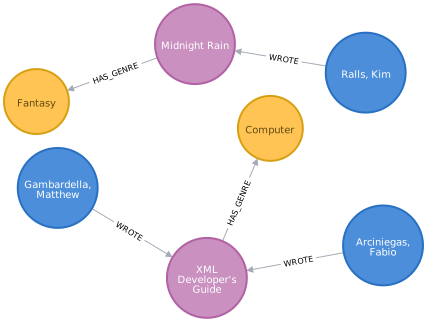
现在,让我们创建一个包含书籍及其元数据、作者和类型的图。
book.xml 并解析结果以提取标题、描述、类型和作者CALL apoc.load.xml("file:///books.xml")
YIELD value
UNWIND value._children AS book
WITH book.id AS bookId,
[item in book._children WHERE item._type = "title"][0] AS title,
[item in book._children WHERE item._type = "description"][0] AS description,
[item in book._children WHERE item._type = "author"] AS authors,
[item in book._children WHERE item._type = "genre"][0] AS genre
MERGE (b:Book {id: bookId})
SET b.title = title._text, b.description = description._text
MERGE (g:Genre {name: genre._text})
MERGE (b)-[:HAS_GENRE]->(g)
WITH b, authors
UNWIND authors AS author
MERGE (a:Author {name:author._text})
MERGE (a)-[:WROTE]->(b);下面的 Neo4j Browser 可视化显示了导入的图
从 GitHub 导入
我们还可以处理来自 HTTP 或 HTTPS URI 的 XML 文件。让我们首先处理 GitHub 上托管的 books.xml 文件。
这次我们将 true 作为过程的第 4 个参数传入。这意味着 XML 将以简单模式解析。
WITH "https://raw.githubusercontent.com/neo4j/apoc/2025.05/core/src/test/resources/xml/books.xml" AS uri
CALL apoc.load.xml(uri, '', {}, true)
YIELD value
RETURN value;| value |
|---|
{_type: "catalog", _catalog: [{_type: "book", _book: [{_type: "author", _text: "Gambardella, Matthew"}, {_type: "author", _text: "Arciniegas, Fabio"}, {_type: "title", _text: "XML Developer’s Guide"}, {_type: "genre", _text: "Computer"}, {_type: "price", _text: "44.95"}, {_type: "publish_date", _text: "2000-10-01"}, {_type: "description", _text: "An in-depth look at creating applications with XML."}], id: "bk101"}, {_type: "book", _book: [{_type: "author", _text: "Ralls, Kim"}, {_type: "title", _text: "Midnight Rain"}, {_type: "genre", _text: "Fantasy"}, {_type: "price", _text: "5.95"}, {_type: "publish_date", _text: "2000-12-16"}, {_type: "description", _text: "A former architect battles corporate zombies, an evil sorceress, and her own childhood to become queen of the world."}], id: "bk102"}, {_type: "book", _book: [{_type: "author", _text: "Corets, Eva"}, {_type: "title", _text: "Maeve Ascendant"}, {_type: "genre", _text: "Fantasy"}, {_type: "price", _text: "5.95"}, {_type: "publish_date", _text: "2000-11-17"}, {_type: "description", _text: "After the collapse of a nanotechnology society in England, the young survivors lay the foundation for a new society."}], id: "bk103"}, {_type: "book", _book: [{_type: "author", _text: "Corets, Eva"}, {_type: "title", _text: "Oberon’s Legacy"}, {_type: "genre", _text: "Fantasy"}, {_type: "price", _text: "5.95"}, {_type: "publish_date", _text: "2001-03-10"}, {_type: "description", _text: "In post-apocalypse England, the mysterious agent known only as Oberon helps to create a new life for the inhabitants of London. Sequel to Maeve Ascendant."}], id: "bk104"}, {_type: "book", _book: [{_type: "author", _text: "Corets, Eva"}, {_type: "title", _text: "The Sundered Grail"}, {_type: "genre", _text: "Fantasy"}, {_type: "price", _text: "5.95"}, {_type: "publish_date", _text: "2001-09-10"}, {_type: "description", _text: "The two daughters of Maeve, half-sisters, battle one another for control of England. Sequel to Oberon’s Legacy."}], id: "bk105"}, {_type: "book", _book: [{_type: "author", _text: "Randall, Cynthia"}, {_type: "title", _text: "Lover Birds"}, {_type: "genre", _text: "Romance"}, {_type: "price", _text: "4.95"}, {_type: "publish_date", _text: "2000-09-02"}, {_type: "description", _text: "When Carla meets Paul at an ornithology conference, tempers fly as feathers get ruffled."}], id: "bk106"}, {_type: "book", _book: [{_type: "author", _text: "Thurman, Paula"}, {_type: "title", _text: "Splish Splash"}, {_type: "genre", _text: "Romance"}, {_type: "price", _text: "4.95"}, {_type: "publish_date", _text: "2000-11-02"}, {_type: "description", _text: "A deep sea diver finds true love twenty thousand leagues beneath the sea."}], id: "bk107"}, {_type: "book", _book: [{_type: "author", _text: "Knorr, Stefan"}, {_type: "title", _text: "Creepy Crawlies"}, {_type: "genre", _text: "Horror"}, {_type: "price", _text: "4.95"}, {_type: "publish_date", _text: "2000-12-06"}, {_type: "description", _text: "An anthology of horror stories about roaches, centipedes, scorpions and other insects."}], id: "bk108"}, {_type: "book", _book: [{_type: "author", _text: "Kress, Peter"}, {_type: "title", _text: "Paradox Lost"}, {_type: "genre", _text: "Science Fiction"}, {_type: "price", _text: "6.95"}, {_type: "publish_date", _text: "2000-11-02"}, {_type: "description", _text: "After an inadvertant trip through a Heisenberg Uncertainty Device, James Salway discovers the problems of being quantum."}], id: "bk109"}, {_type: "book", _book: [{_type: "author", _text: "O’Brien, Tim"}, {_type: "title", _text: "Microsoft .NET: The Programming Bible"}, {_type: "genre", _text: "Computer"}, {_type: "price", _text: "36.95"}, {_type: "publish_date", _text: "2000-12-09"}, {_type: "description", _text: "Microsoft’s .NET initiative is explored in detail in this deep programmer’s reference."}], id: "bk110"}, {_type: "book", _book: [{_type: "author", _text: "O’Brien, Tim"}, {_type: "title", _text: "MSXML3: A Comprehensive Guide"}, {_type: "genre", _text: "Computer"}, {_type: "price", _text: "36.95"}, {_type: "publish_date", _text: "2000-12-01"}, {_type: "description", _text: "The Microsoft MSXML3 parser is covered in detail, with attention to XML DOM interfaces, XSLT processing, SAX and more."}], id: "bk111"}, {_type: "book", _book: [{_type: "author", _text: "Galos, Mike"}, {_type: "title", _text: "Visual Studio 7: A Comprehensive Guide"}, {_type: "genre", _text: "Computer"}, {_type: "price", _text: "49.95"}, {_type: "publish_date", _text: "2001-04-16"}, {_type: "description", _text: "Microsoft Visual Studio 7 is explored in depth, looking at how Visual Basic, Visual C+, C#, and ASP are integrated into a comprehensive development environment."}], id: "bk112"}]} |
我们再次得到一个表示 XML 结构的映射,但其结构与不使用简单模式时不同。这次,嵌套的 XML 元素可以通过以 _ 为前缀的元素名称属性来访问。
我们可以编写以下查询来更好地理解文件内容。
book.xml 并解析结果以提取标题、描述、类型和作者WITH "https://raw.githubusercontent.com/neo4j/apoc/2025.05/core/src/test/resources/xml/books.xml" AS uri
CALL apoc.load.xml(uri, '', {}, true)
YIELD value
UNWIND value._catalog AS catalog
RETURN catalog.id AS bookId,
[item in catalog._book WHERE item._type = "title"][0] AS title,
[item in catalog._book WHERE item._type = "description"][0] AS description,
[item in catalog._book WHERE item._type = "author"] AS authors,
[item in catalog._book WHERE item._type = "genre"][0] AS genre;| bookId | 标题 | 描述 | 作者 | 类型 |
|---|---|---|---|---|
"bk101" |
{_type: "title", _text: "XML Developer’s Guide"} |
{_type: "description", _text: "An in-depth look at creating applications with XML."} |
[{_type: "author", _text: "Gambardella, Matthew"}, {_type: "author", _text: "Arciniegas, Fabio"}] |
{_type: "genre", _text: "Computer"} |
"bk102" |
{_type: "title", _text: "Midnight Rain"} |
{_type: "description", _text: "A former architect battles corporate zombies, an evil sorceress, and her own childhood to become queen of the world."} |
[{_type: "author", _text: "Ralls, Kim"}] |
{_type: "genre", _text: "Fantasy"} |
"bk103" |
{_type: "title", _text: "Maeve Ascendant"} |
{_type: "description", _text: "After the collapse of a nanotechnology society in England, the young survivors lay the foundation for a new society."} |
[{_type: "author", _text: "Corets, Eva"}] |
{_type: "genre", _text: "Fantasy"} |
"bk104" |
{_type: "title", _text: "Oberon’s Legacy"} |
{_type: "description", _text: "In post-apocalypse England, the mysterious agent known only as Oberon helps to create a new life for the inhabitants of London. Sequel to Maeve Ascendant."} |
[{_type: "author", _text: "Corets, Eva"}] |
{_type: "genre", _text: "Fantasy"} |
"bk105" |
{_type: "title", _text: "The Sundered Grail"} |
{_type: "description", _text: "The two daughters of Maeve, half-sisters, battle one another for control of England. Sequel to Oberon’s Legacy."} |
[{_type: "author", _text: "Corets, Eva"}] |
{_type: "genre", _text: "Fantasy"} |
"bk106" |
{_type: "title", _text: "Lover Birds"} |
{_type: "description", _text: "When Carla meets Paul at an ornithology conference, tempers fly as feathers get ruffled."} |
[{_type: "author", _text: "Randall, Cynthia"}] |
{_type: "genre", _text: "Romance"} |
"bk107" |
{_type: "title", _text: "Splish Splash"} |
{_type: "description", _text: "A deep sea diver finds true love twenty thousand leagues beneath the sea."} |
[{_type: "author", _text: "Thurman, Paula"}] |
{_type: "genre", _text: "Romance"} |
"bk108" |
{_type: "title", _text: "Creepy Crawlies"} |
{_type: "description", _text: "An anthology of horror stories about roaches, centipedes, scorpions and other insects."} |
[{_type: "author", _text: "Knorr, Stefan"}] |
{_type: "genre", _text: "Horror"} |
"bk109" |
{_type: "title", _text: "Paradox Lost"} |
{_type: "description", _text: "After an inadvertant trip through a Heisenberg Uncertainty Device, James Salway discovers the problems of being quantum."} |
[{_type: "author", _text: "Kress, Peter"}] |
{_type: "genre", _text: "Science Fiction"} |
"bk110" |
{_type: "title", _text: "Microsoft .NET: The Programming Bible"} |
{_type: "description", _text: "Microsoft’s .NET initiative is explored in detail in this deep programmer’s reference."} |
[{_type: "author", _text: "O’Brien, Tim"}] |
{_type: "genre", _text: "Computer"} |
"bk111" |
{_type: "title", _text: "MSXML3: A Comprehensive Guide"} |
{_type: "description", _text: "The Microsoft MSXML3 parser is covered in detail, with attention to XML DOM interfaces, XSLT processing, SAX and more."} |
[{_type: "author", _text: "O’Brien, Tim"}] |
{_type: "genre", _text: "Computer"} |
"bk112" |
{_type: "title", _text: "Visual Studio 7: A Comprehensive Guide"} |
{_type: "description", _text: "Microsoft Visual Studio 7 is explored in depth, looking at how Visual Basic, Visual C+, C#, and ASP are integrated into a comprehensive development environment."} |
[{_type: "author", _text: "Galos, Mike"}] |
{_type: "genre", _text: "Computer"} |
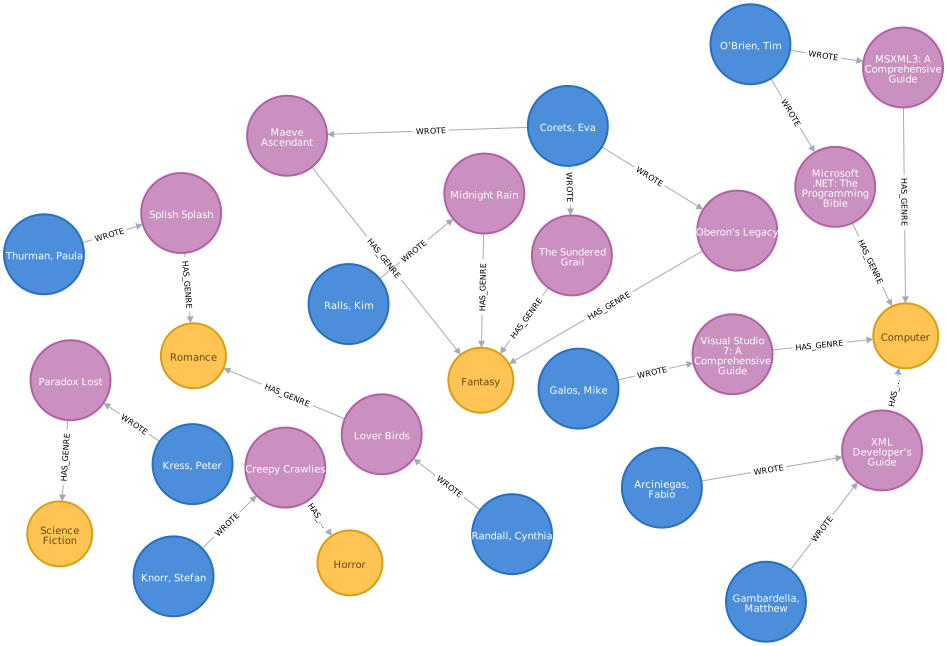
除了只返回数据,我们还可以创建一个包含书籍及其元数据、作者和类型的图。
book.xml 并解析结果以提取标题、描述、类型和作者WITH "https://raw.githubusercontent.com/neo4j/apoc/2025.05/core/src/test/resources/xml/books.xml" AS uri
CALL apoc.load.xml(uri, '', {}, true)
YIELD value
UNWIND value._catalog AS catalog
WITH catalog.id AS bookId,
[item in catalog._book WHERE item._type = "title"][0] AS title,
[item in catalog._book WHERE item._type = "description"][0] AS description,
[item in catalog._book WHERE item._type = "author"] AS authors,
[item in catalog._book WHERE item._type = "genre"][0] AS genre
MERGE (b:Book {id: bookId})
SET b.title = title._text, b.description = description._text
MERGE (g:Genre {name: genre._text})
MERGE (b)-[:HAS_GENRE]->(g)
WITH b, authors
UNWIND authors AS author
MERGE (a:Author {name:author._text})
MERGE (a)-[:WROTE]->(b);下面的 Neo4j Browser 可视化显示了导入的图
XPath 表达式
我们还可以提供一个 XPath 表达式来从 XML 文档中选择节点。如果只希望返回类型为 Computer 的书籍,可以编写以下查询
CALL apoc.load.xml(
  "https://raw.githubusercontent.com/neo4j/apoc/2025.05/core/src/test/resources/xml/books.xml",
  '/catalog/book[genre=\"Computer\"]'
)
YIELD value as book
WITH book.id as id, [attr IN book._children WHERE attr._type IN ['title','price'] | attr._text] as pairs
RETURN id, pairs[0] as title, pairs[1] as price;| id | 标题 | 价格 |
|---|---|---|
"bk101" |
"XML Developer’s Guide" |
"44.95" |
"bk110" |
"Microsoft .NET: The Programming Bible" |
"36.95" |
"bk111" |
"MSXML3: A Comprehensive Guide" |
"36.95" |
"bk112" |
"Visual Studio 7: A Comprehensive Guide" |
"49.95" |
在这种情况下,我们只返回 id、title 和 price,但我们可以返回任何其他元素
我们也可以只返回一个特定的元素。例如,以下查询返回 id = bg102 的书籍的 author
CALL apoc.load.xml(
  'https://raw.githubusercontent.com/neo4j/apoc/2025.05/core/src/test/resources/xml/books.xml',
  '/catalog/book[@id="bk102"]/author'
)
YIELD value as result
WITH result._text as author
RETURN author;| 作者 |
|---|
"Ralls, Kim" |
使用 XPath 避免 OOM
通常,为了避免堆空间错误(Heap Space Errors),处理大文件时,如果可能,应始终尝试以流式而不是唯一结果的方式返回结果,以避免出现 java.lang.OutOfMemoryError: Java heap space。例如,对于这样的文件:.book.xml
<?xml version="1.0" encoding="UTF-8"?>
<!-- <graphml xmlns="http://graphml.graphdrawing.org/xmlns" xmlns:xsi="http://www.w3.org/2001/XMLSchema-instance" xsi:schemaLocation="http://graphml.graphdrawing.org/xmlns http://graphml.graphdrawing.org/xmlns/1.0/graphml.xsd"> -->
<graphml name="databases">
<key id="name" for="node" attr.name="name"/>
<key id="tagline" for="node" attr.name="tagline"/>
<key id="title" for="node" attr.name="title"/>
<key id="labels" for="node" attr.name="labels"/>
<key id="summary" for="edge" attr.name="summary"/>
<key id="label" for="edge" attr.name="label"/>
<graph id="G" edgedefault="directed">
  <node id="n0" labels=":Movie"><data key="labels">:Movie</data><data key="title">The Matrix</data><data key="tagline">Welcome to the Real World</data><data key="released">1999</data></node>
  <node id="n1" labels=":Person"><data key="labels">:Person</data><data key="born">1964</data><data key="name">Keanu Reeves</data></node>
  <node id="n2" labels=":Person"><data key="labels">:Person</data><data key="born">1967</data><data key="name">Carrie-Anne Moss</data></node>
  <node id="n3" labels=":Person"><data key="labels">:Person</data><data key="born">1961</data><data key="name">Laurence Fishburne</data></node>
  <node id="n4" labels=":Person"><data key="labels">:Person</data><data key="born">1960</data><data key="name">Hugo Weaving</data></node>
  <node id="n5" labels=":Person"><data key="labels">:Person</data><data key="born">1967</data><data key="name">Lilly Wachowski</data></node>
  <node id="n6" labels=":Person"><data key="labels">:Person</data><data key="born">1965</data><data key="name">Lana Wachowski</data></node>
    // a lot of other node tags...

  <edge id="e17" source="n3" target="n10" label="ACTED_IN"><data key="label">ACTED_IN</data><data key="roles">["Morpheus"]</data></edge>
  <edge id="e18" source="n4" target="n10" label="ACTED_IN"><data key="label">ACTED_IN</data><data key="roles">["Agent Smith"]</data></edge>
    // a lot of other edge tags...

  <foo id="id2">foo2</foo>
  <foo id="id3">foo3</foo>
 // ...
</graph>
</graphml>
你可以通过以下方式提取 graph 标签的所有子元素
CALL apoc.load.xml('databases.xml', '/graphml/graph/*', {})
YIELD value RETURN value ORDER BY value.id| value |
|---|
{"_children":[{"_type":"data","_text":"ACTED_IN","key":"label"},{"_type":"data","_text":"["Morpheus"]","key":"roles"}],"_type":"edge","id":"e17","label":"ACTED_IN","source":"n3","target":"n10"} |
{"_children":[{"_type":"data","_text":"ACTED_IN","key":"label"},{"_type":"data","_text":"["Agent Smith"]","key":"roles"}],"_type":"edge","id":"e18","label":"ACTED_IN","source":"n4","target":"n10"} |
{"_type":"foo","id":"id2","_text":"foo2"} |
{"_type":"foo","id":"id3","_text":"foo3"} |
{"_children":[{"_type":"data","_text":":Movie","key":"labels"},{"_type":"data","_text":"The Matrix","key":"title"},{"_type":"data","_text":"Welcome to the Real World","key":"tagline"},{"_type":"data","_text":"1999","key":"released"}],"_type":"node","id":"n0","labels":":Movie"} |
{"_children":[{"_type":"data","_text":":Person","key":"labels"},{"_type":"data","_text":"1964","key":"born"},{"_type":"data","_text":"Keanu Reeves","key":"name"}],"_type":"node","id":"n1","labels":":Person"} |
{"_children":[{"_type":"data","_text":":Person","key":"labels"},{"_type":"data","_text":"1967","key":"born"},{"_type":"data","_text":"Carrie-Anne Moss","key":"name"}],"_type":"node","id":"n2","labels":":Person"} |
{"_children":[{"_type":"data","_text":":Person","key":"labels"},{"_type":"data","_text":"1961","key":"born"},{"_type":"data","_text":"Laurence Fishburne","key":"name"}],"_type":"node","id":"n3","labels":":Person"} |
{"_children":[{"_type":"data","_text":":Person","key":"labels"},{"_type":"data","_text":"1960","key":"born"},{"_type":"data","_text":"Hugo Weaving","key":"name"}],"_type":"node","id":"n4","labels":":Person"} |
{"_children":[{"_type":"data","_text":":Person","key":"labels"},{"_type":"data","_text":"1967","key":"born"},{"_type":"data","_text":"Lilly Wachowski","key":"name"}],"_type":"node","id":"n5","labels":":Person"} |
{"_children":[{"_type":"data","_text":":Person","key":"labels"},{"_type":"data","_text":"1965","key":"born"},{"_type":"data","_text":"Lana Wachowski","key":"name"}],"_type":"node","id":"n6","labels":":Person"} |
或者如果你只想包含 node 标签
CALL apoc.load.xml('largeFile.xml', '/graphml/graph/node', {})
YIELD value RETURN value ORDER BY value.id| value |
|---|
{"_children":[{"_type":"data","_text":":Movie","key":"labels"},{"_type":"data","_text":"The Matrix","key":"title"},{"_type":"data","_text":"Welcome to the Real World","key":"tagline"},{"_type":"data","_text":"1999","key":"released"}],"_type":"node","id":"n0","labels":":Movie"} |
{"_children":[{"_type":"data","_text":":Person","key":"labels"},{"_type":"data","_text":"1964","key":"born"},{"_type":"data","_text":"Keanu Reeves","key":"name"}],"_type":"node","id":"n1","labels":":Person"} |
{"_children":[{"_type":"data","_text":":Person","key":"labels"},{"_type":"data","_text":"1967","key":"born"},{"_type":"data","_text":"Carrie-Anne Moss","key":"name"}],"_type":"node","id":"n2","labels":":Person"} |
{"_children":[{"_type":"data","_text":":Person","key":"labels"},{"_type":"data","_text":"1961","key":"born"},{"_type":"data","_text":"Laurence Fishburne","key":"name"}],"_type":"node","id":"n3","labels":":Person"} |
{"_children":[{"_type":"data","_text":":Person","key":"labels"},{"_type":"data","_text":"1960","key":"born"},{"_type":"data","_text":"Hugo Weaving","key":"name"}],"_type":"node","id":"n4","labels":":Person"} |
{"_children":[{"_type":"data","_text":":Person","key":"labels"},{"_type":"data","_text":"1967","key":"born"},{"_type":"data","_text":"Lilly Wachowski","key":"name"}],"_type":"node","id":"n5","labels":":Person"} |
{"_children":[{"_type":"data","_text":":Person","key":"labels"},{"_type":"data","_text":"1965","key":"born"},{"_type":"data","_text":"Lana Wachowski","key":"name"}],"_type":"node","id":"n6","labels":":Person"} |
你也可以使用 or 包含多个标签名,例如
CALL apoc.load.xml('largeFile.xml', 'graphml/graph/*[self::node or self::edge]', {})
YIELD value RETURN value ORDER BY value.id| value |
|---|
{"_children":[{"_type":"data","_text":"ACTED_IN","key":"label"},{"_type":"data","_text":"["Morpheus"]","key":"roles"}],"_type":"edge","id":"e17","label":"ACTED_IN","source":"n3","target":"n10"} |
{"_children":[{"_type":"data","_text":"ACTED_IN","key":"label"},{"_type":"data","_text":"["Agent Smith"]","key":"roles"}],"_type":"edge","id":"e18","label":"ACTED_IN","source":"n4","target":"n10"} |
{"_children":[{"_type":"data","_text":":Movie","key":"labels"},{"_type":"data","_text":"The Matrix","key":"title"},{"_type":"data","_text":"Welcome to the Real World","key":"tagline"},{"_type":"data","_text":"1999","key":"released"}],"_type":"node","id":"n0","labels":":Movie"} |
{"_children":[{"_type":"data","_text":":Person","key":"labels"},{"_type":"data","_text":"1964","key":"born"},{"_type":"data","_text":"Keanu Reeves","key":"name"}],"_type":"node","id":"n1","labels":":Person"} |
{"_children":[{"_type":"data","_text":":Person","key":"labels"},{"_type":"data","_text":"1967","key":"born"},{"_type":"data","_text":"Carrie-Anne Moss","key":"name"}],"_type":"node","id":"n2","labels":":Person"} |
{"_children":[{"_type":"data","_text":":Person","key":"labels"},{"_type":"data","_text":"1961","key":"born"},{"_type":"data","_text":"Laurence Fishburne","key":"name"}],"_type":"node","id":"n3","labels":":Person"} |
{"_children":[{"_type":"data","_text":":Person","key":"labels"},{"_type":"data","_text":"1960","key":"born"},{"_type":"data","_text":"Hugo Weaving","key":"name"}],"_type":"node","id":"n4","labels":":Person"} |
{"_children":[{"_type":"data","_text":":Person","key":"labels"},{"_type":"data","_text":"1967","key":"born"},{"_type":"data","_text":"Lilly Wachowski","key":"name"}],"_type":"node","id":"n5","labels":":Person"} |
{"_children":[{"_type":"data","_text":":Person","key":"labels"},{"_type":"data","_text":"1965","key":"born"},{"_type":"data","_text":"Lana Wachowski","key":"name"}],"_type":"node","id":"n6","labels":":Person"} |
请参阅 Java XPath 文档 和 w3School 教程 以获取更多示例和详细信息。
提取数据结构
我们可以使用 apoc.map.fromPairs 函数将值转换为映射。
call apoc.load.xml("https://raw.githubusercontent.com/neo4j/apoc/2025.05/core/src/test/resources/xml/books.xml")
yield value as catalog
UNWIND catalog._children as book
WITH book.id as id, [attr IN book._children WHERE attr._type IN ['author','title'] | [attr._type, attr._text]] as pairs
WITH id, apoc.map.fromPairs(pairs) AS value
RETURN id, value| id | value |
|---|---|
"bk101" |
{title: "XML Developer’s Guide", author: "Arciniegas, Fabio"} |
"bk102" |
{title: "Midnight Rain", author: "Ralls, Kim"} |
"bk103" |
{title: "Maeve Ascendant", author: "Corets, Eva"} |
"bk104" |
{title: "Oberon’s Legacy", author: "Corets, Eva"} |
"bk105" |
{title: "The Sundered Grail", author: "Corets, Eva"} |
"bk106" |
{title: "Lover Birds", author: "Randall, Cynthia"} |
"bk107" |
{title: "Splish Splash", author: "Thurman, Paula"} |
"bk108" |
{title: "Creepy Crawlies", author: "Knorr, Stefan"} |
"bk109" |
{title: "Paradox Lost", author: "Kress, Peter"} |
"bk110" |
{title: "Microsoft .NET: The Programming Bible", author: "O’Brien, Tim"} |
"bk111" |
{title: "MSXML3: A Comprehensive Guide", author: "O’Brien, Tim"} |
"bk112" |
{title: "Visual Studio 7: A Comprehensive Guide", author: "Galos, Mike"} |
现在我们可以清晰地从映射中访问属性。
call apoc.load.xml("https://raw.githubusercontent.com/neo4j/apoc/2025.05/core/src/test/resources/xml/books.xml")
yield value as catalog
UNWIND catalog._children as book
WITH book.id as id, [attr IN book._children WHERE attr._type IN ['author','title'] | [attr._type, attr._text]] as pairs
WITH id, apoc.map.fromPairs(pairs) AS value
RETURN id, value.title, value.author| id | value.title | value.author |
|---|---|---|
"bk101" |
"XML Developer’s Guide" |
"Arciniegas, Fabio" |
"bk102" |
"Midnight Rain" |
"Ralls, Kim" |
"bk103" |
"Maeve Ascendant" |
"Corets, Eva" |
"bk104" |
"Oberon’s Legacy" |
"Corets, Eva" |
"bk105" |
"The Sundered Grail" |
"Corets, Eva" |
"bk106" |
"Lover Birds" |
"Randall, Cynthia" |
"bk107" |
"Splish Splash" |
"Thurman, Paula" |
"bk108" |
"Creepy Crawlies" |
"Knorr, Stefan" |
"bk109" |
"Paradox Lost" |
"Kress, Peter" |
"bk110" |
"Microsoft .NET: The Programming Bible" |
"O’Brien, Tim" |
"bk111" |
"MSXML3: A Comprehensive Guide" |
"O’Brien, Tim" |
"bk112" |
"Visual Studio 7: A Comprehensive Guide" |
"Galos, Mike" |
二进制文件
你还可以从二进制 byte[] 文件(未压缩)或压缩文件(允许的压缩算法有:GZIP、BZIP2、DEFLATE、BLOCK_LZ4、FRAMED_SNAPPY)导入文件。
CALL apoc.load.xml(`binaryGzipByteArray`, '/', {compression: 'GZIP'})或
CALL apoc.load.xml(`binaryFileNotCompressed`, '/', {compression: 'NONE'})例如,这与 apoc.util.compress 函数配合良好
WITH apoc.util.compress('<?xml version="1.0" encoding="UTF-8"?>
<parent name="databases">
    <child name="Neo4j">
        Neo4j is a graph database
    </child>
    <child name="relational">
        <grandchild name="MySQL"><![CDATA[
            MySQL is a database & relational
            ]]>
        </grandchild>
        <grandchild name="Postgres">
            Postgres is a relational database
        </grandchild>
    </child>
</parent>', {compression: 'DEFLATE'}) as xmlCompressed

CALL apoc.load.xml(xmlCompressed, '/', {compression: 'DEFLATE'})
YIELD value
RETURN value| value |
|---|
[source,json] ---- { "_type": "parent", "name": "databases", "_children": [{ "_type": "child", "name": "Neo4j", "_text": "Neo4j is a graph database" }, { "_type": "child", "name": "relational", "_children": [{ "_type": "grandchild", "name": "MySQL", "_text": "MySQL is a database & relational" }, { "_type": "grandchild", "name": "Postgres", "_text": "Postgres is a relational database" } ] } ] } ---- |