Neo4j LLM 知识图谱构建器 - 从非结构化文本中提取节点和关系
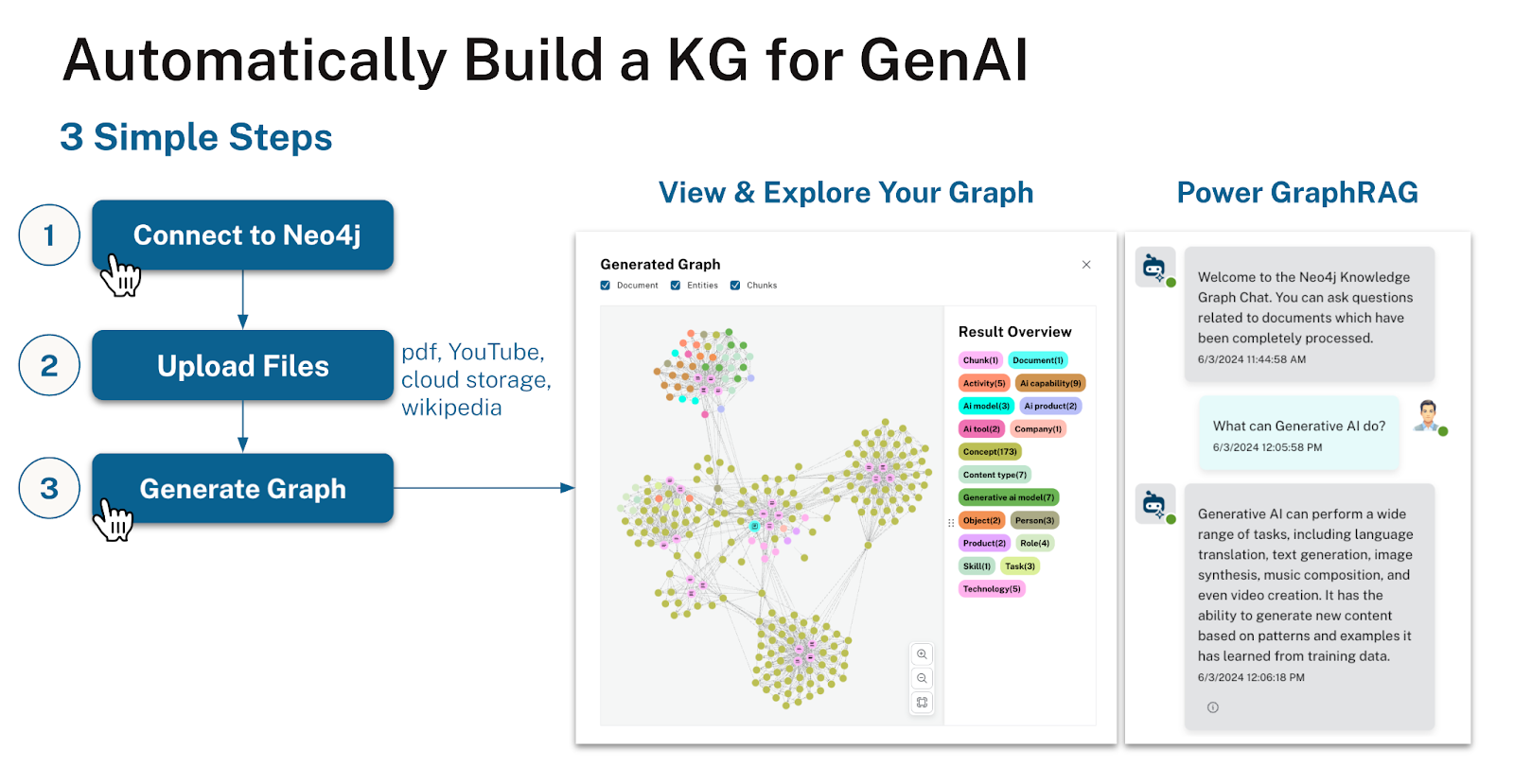
The Neo4j LLM Knowledge Graph Builder is an 在线应用 for turning unstructured text into a knowledge graph, it provides a magical text to graph experience.
It uses ML models (LLM - OpenAI, Gemini, Llama3, Diffbot, Claude, Qwen) to transform PDFs, documents, images, web pages, and YouTube video transcripts. The extraction turns them into a lexical graph of documents and chunks (with embeddings) and an entity graph with nodes and their relationships, which are both stored in your Neo4j database. You can configure the extraction schema and apply clean-up operations after the extraction.
Afterwards you can use different RAG approaches (GraphRAG, Vector, Text2Cypher) to ask questions of your data and see how the extracted data is used to construct the answers.
|
The front-end is a React Application and the back-end a Python FastAPI application running on Google Cloud Run, but you can deploy it locally using docker compose. It uses the llm-graph-transformer module that Neo4j contributed to LangChain and other langchain integrations (e.g. for GraphRAG search).
All Features are documented in detail here: Features documentation
Here is a quick demo
分步说明
-
Open the LLM 知识图谱构建器
-
Connect to a Neo4j(Aura) instance
-
Provide your PDFs, Documents, URLs or S3/GCS buckets
-
Construct Graph with the selected LLM
-
Visualize Knowledge Graph in App
-
Chat with your data using GraphRAG
-
Open Neo4j Bloom for further visual exploration
-
Use the constructed knowledge graph in your applications

|
工作原理
-
Uploaded Sources are stored as
Documentnodes in the graph -
Each document (type) is loaded with the LangChain Loaders
-
The content is split into Chunks
-
Chunks are stored in the graph and connected to the Document and to each other for advanced RAG patterns
-
Highly similar Chunks are connected with a
SIMILARrelationship to form a kNN Graph -
Embeddings are computed and stored in the Chunks and Vector index
-
Using the llm-graph-transformer or diffbot-graph-transformer entities and relationships are extracted from the text
-
Entities and relationships are stored in the graph and connected to the originating Chunks

相关链接
Online Application |
|
作者 |
Michael Hunger, Tomaz Bratanic, Niels De Jong, Morgan Senechal, Persistent Team |
社区支持 |
|
存储库 |
|
问题追踪 |
|
LangChain |
安装
The LLM 知识图谱构建器应用 is available online.
You can also run it locally, by cloning the GitHub repository and following the instructions in the README.md file.
It is using Docker for packaging front-end and back-end, and you can run docker-compose up to start the whole application.
Local deployment and configuration details are available in the Documentation for local deployments
